Google AI Studio
Last updated:
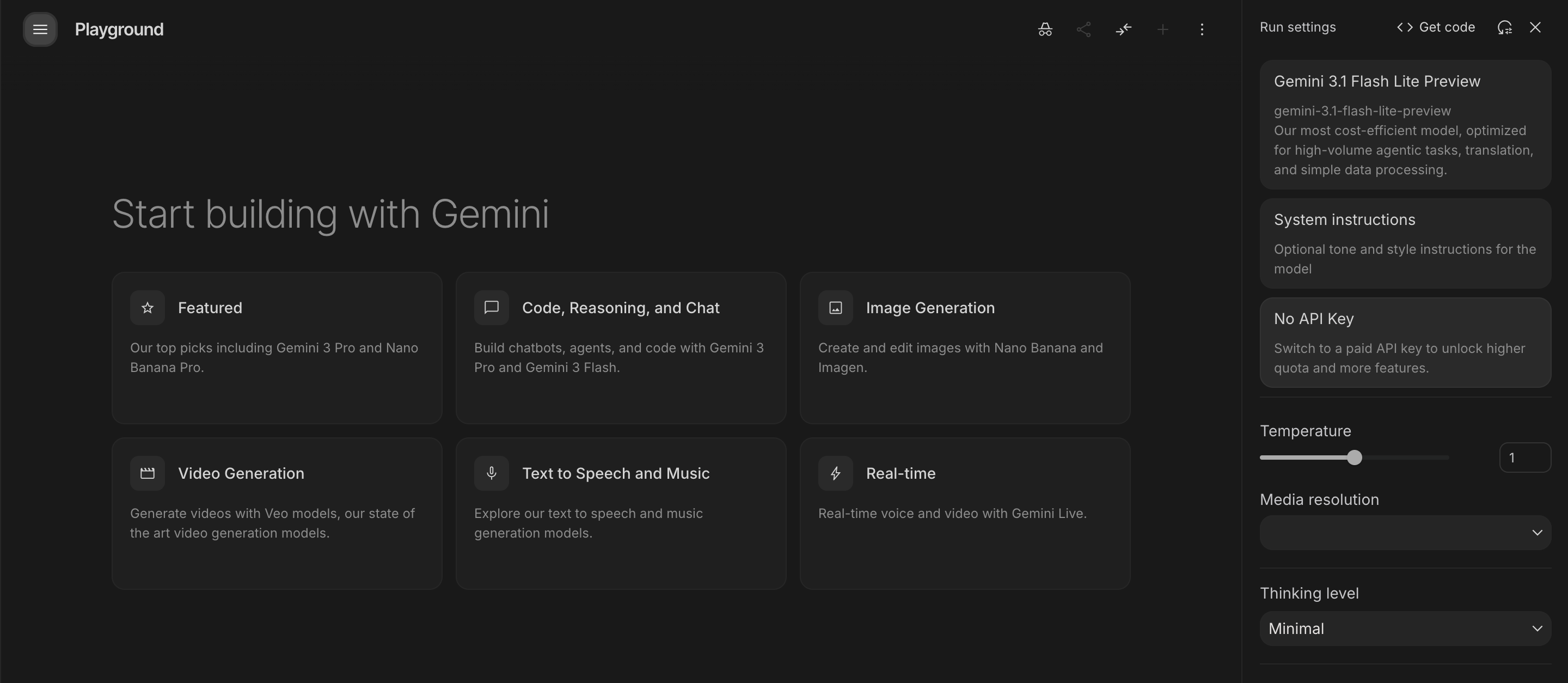
Google AI Studio is a web-based prototyping environment built specifically to accelerate development with Google's Gemini family of generative AI models. It serves as the primary gateway to the Gemini API, allowing developers to experiment with text, image, audio, and video inputs through a visual interface before writing a single line of production code. The platform provides access to Google's full model lineup, including Gemini 2.5 Pro, Gemini 2.5 Flash, and the latest preview models, all within a browser-based workspace. Developers can configure system instructions, adjust temperature and safety settings, enable specialized tools such as code execution, function calling, and Google Search grounding, and test structured output formatting. Once a prototype is refined, the Get Code button exports a ready-to-run implementation in the developer's preferred programming language. Google AI Studio also handles API key generation, making it the single starting point for both exploration and authentication. It bridges casual experimentation with full production deployment via the Gemini API.
How It Works
Developers begin by signing into Google AI Studio at aistudio.google.com and selecting a prompt type, with Chat being the most common starting point. From there, they write system instructions that shape model behavior, defining tone, response style, persona, or constraints. The Run Settings panel exposes model parameters including temperature, output token limits, and safety filters, as well as optional tools such as code execution, function calling, Google Search grounding, and structured output formatting. Users submit prompts and iterate in real time, modifying instructions until responses meet their requirements. When the prototype is satisfying, the Get Code button generates implementation-ready code in Python, JavaScript, or other supported languages. The API key section allows developers to generate credentials that authenticate requests to the Gemini API from any external application. The entire flow is designed to move from zero to a working integration without any local setup, infrastructure, or prior AI development experience.
Key Features
- ✓Gemini model access: Test multiple Gemini model variants including Gemini 2.5 Flash and Pro from a unified interface
- ✓1M+ token context window: Handle entire codebases, lengthy documents, and extended research sessions in a single prompt
- ✓Build mode: Describe an app in plain text and generate functional code without writing it manually
- ✓Stream mode: Real-time multimodal conversations using your camera, microphone, and screen share
- ✓Multimodal file uploads: Attach images, audio, video, PDFs, and Google Drive content in any prompt
- ✓Image generation: Generate images using Imagen 4 directly within AI Studio
- ✓Audio generation with Lyria 2: Create music tracks from text descriptions for creative and production projects
- ✓Free API key generation: Get a production-ready API key with one click, no billing required to start
- ✓Pay-as-you-go API billing: Scale to production with no platform subscription - pay only for tokens used
- ✓Prompt design tools: Save, version, and iterate on prompts for systematic testing and refinement
- ✓Structured output testing: Validate JSON schema and function calling before shipping to production
- ✓No login barrier: Access with any standard Google account with no credit card required
Best For
Frequently Asked Questions
Is Google AI Studio actually free?
Yes. AI Studio itself charges nothing — no subscription, no platform fee, no credit card required. The free tier includes access to several Gemini models with rate limits. Costs only apply when you use an API key with paid-tier volume through Google Cloud billing.
What is Build mode?
Build mode is a code generation feature where you describe an application in plain language and Gemini generates functional code. Often called vibe coding, it's designed for non-developers or developers who want to prototype fast without writing boilerplate from scratch.
What models are available?
AI Studio provides access to multiple Gemini model variants including Gemini 2.5 Flash, 2.5 Flash-Lite, 2.5 Pro, and newer releases. Model availability in the free tier changes as Google updates its lineup. Paid API tiers unlock higher rate limits and additional models.
How large is the context window?
Gemini 2.5 Pro in AI Studio supports over 1 million tokens — enough to process an entire novel, large codebase, or extended research corpus in a single session. This is one of the largest context windows available among frontier AI platforms.
Can I use AI Studio for production apps?
AI Studio is primarily a prototyping environment. When you're ready for production, take the API key generated in AI Studio and connect it to Google Cloud's Gemini API endpoints with production billing. Prompts and configurations export directly into production-ready code.
Pricing
Free
Rate-limited API access, Google AI Studio included, all core Gemini models available
Pay-as-you-go
From $0.10 per 1M input tokens (Gemini 2.5 Flash-Lite), higher rate limits, data not used for training, context caching available
Enterprise (Vertex AI)
Provisioned throughput, advanced security and compliance, volume discounts, dedicated support