TranscribeGo
Last updated:
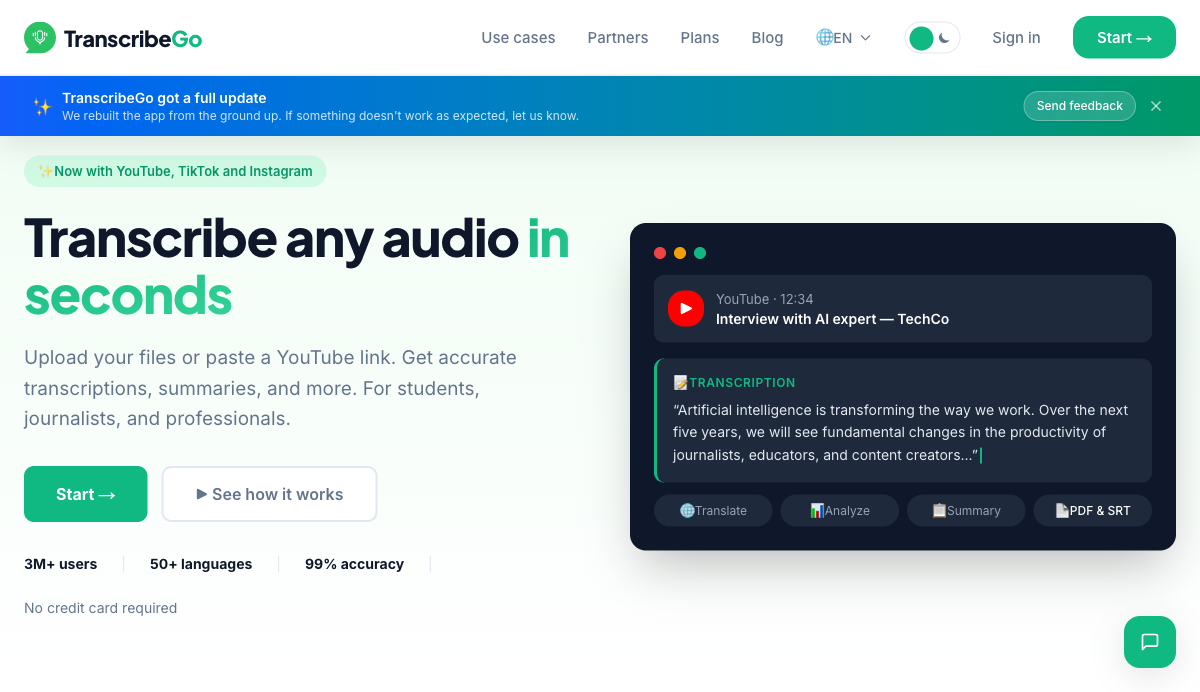
TranscribeGo is a browser-based transcription platform built by RatherLabs in Argentina that lets users transcribe audio and video from 13+ sources including YouTube, TikTok, Instagram, WhatsApp, Telegram, Vimeo, SoundCloud, and any URL. With over 3 million users and 10 million audios transcribed, the platform claims 99% transcription accuracy across 50+ languages. No installation is required: users can upload files directly, paste video links, or use the WhatsApp and Telegram bots to send voice notes and receive transcriptions in seconds. What separates TranscribeGo from single-purpose transcription tools is the post-transcription layer. Once audio is transcribed, users can generate AI summaries, translate into any of 50+ supported languages, create auto infographics, or switch into Journalist mode to produce a full SEO- and AEO-optimized article. Journalist mode includes 4 writing tones, first or third person perspective selection, custom instructions (such as specifying the speaker role and event context), and a Synthesis with Declarations mode that preserves verbatim quotes for journalistic accuracy. Articles also come with suggested authoritative sources categorized by type. The platform targets journalists, students, content creators, and professionals. Journalists can go from a 45-minute field recording to a published article draft in under 10 minutes. Students send class audio via WhatsApp and receive summarized transcriptions without opening any app. Creators use the SRT export to generate subtitles for YouTube, TikTok, and Instagram across multiple languages. The site also references an Enterprise tier and a Partners program for businesses that need custom minute allocations, CRM integration, and API access. TranscribeGo accepts payment via Stripe (USD) and MercadoPago (ARS), reflecting its Latin American origin and user base. The Free plan requires no credit card and includes 10 minutes per month permanently, making it accessible to users who need occasional transcription without committing to a paid tier.
How It Works
Users reach TranscribeGo through three access points: the web app at transcribego.com, the WhatsApp bot (TranscribeMe, reachable via QR code or direct contact), or the Telegram bot (@TranscribeME_bot). On the web app, users upload an audio file directly or paste a URL from YouTube, TikTok, Instagram, Vimeo, or any of the 13+ supported platforms. The AI engine processes the file, auto-detects the language, and returns the full transcription in under 2 minutes on average. From the transcription dashboard, users choose what to do next. The toolbar shows options for Translation, AI Analysis, Summary, PDF export, SRT export, and Article generation. Clicking Summary produces a concise version of even a 2-hour lecture. Clicking Translate auto-converts the transcript into the user preferred language. The AI Analysis option extracts key points, direct quotes, main topics, and relevant data from the conversation. Journalists working in Journalist mode select a writing tone (Journalistic, Institutional, Formal, or Informal), choose first or third person perspective, and optionally provide custom instructions about the speaker and context. The AI then generates an SEO-optimized article with an H1, meta description, AEO-ready direct-answer paragraphs, related keyword suggestions, and categorized source suggestions for fact-checking and link building. Users can edit the article directly in the built-in text editor or use the AI chat panel to request specific changes. Export options include PDF, DOCX, SRT subtitle files, and clipboard copy for pasting into a CMS. On the WhatsApp and Telegram bots, the workflow is even simpler: send a voice note or forward an audio file and receive the transcription text directly in the chat thread, with the option to continue in the web app for article generation and advanced exports.
Key Features
- ✓Multi-platform transcription: Transcribes audio and video from YouTube, TikTok, Instagram, WhatsApp, Telegram, Vimeo, SoundCloud, Facebook, Twitch, Dailymotion, X.com, and any URL
- ✓99% accuracy AI engine: Handles accents, background noise, and low-quality recordings; processes files from 30 seconds up to 30+ minutes
- ✓50+ language support: Auto-detects the speaker language and translates to your preferred language with no manual configuration
- ✓WhatsApp Bot: Send a voice note or forwarded audio to the TranscribeMe WhatsApp contact and receive the transcription in seconds without any app install
- ✓Telegram Bot: Search for @TranscribeME_bot, send a voice note or audio file, and get the transcription back instantly in chat
- ✓Smart summaries: Generates concise summaries of long recordings, tested with 1-hour interviews and 2-hour lectures
- ✓AI article generation: Journalist mode produces SEO-optimized, AEO-ready articles from transcriptions, with 4 writing tones and first/third person perspective options
- ✓Auto infographics: Converts interviews and talks into publish-ready infographic layouts for social media (Pro plan)
- ✓SRT subtitle export: Generates precisely timed subtitle files for YouTube, TikTok, and Instagram in one click
- ✓PDF and Word export: Downloads transcriptions with speaker diarization, timestamps, and summaries in PDF or DOCX format
- ✓Voice reminders: Set up voice-based reminders via WhatsApp or Telegram bot (3 on Free, 20 on Starter, 50 on Pro)
- ✓Live editing with AI chat: Edit transcription or article text directly in the browser, or prompt the built-in AI chat to rewrite sections
Best For
Frequently Asked Questions
How many minutes does the free plan include?
The Free plan includes 10 minutes of transcription per month permanently with no credit card required. It supports WhatsApp, the web app, transcription, translation, and AI summaries.
What is the difference between Starter and Pro?
Starter gives 200 minutes per month at $3.99/month and covers WhatsApp, Web, YouTube, TikTok, and Instagram. Pro gives 1,000 minutes per month at $12.99/month, adds all platforms, article generation, auto infographics, and advanced export options.
Which video and audio platforms does TranscribeGo support?
13+ platforms are supported: YouTube, TikTok, Instagram, WhatsApp, Telegram, Vimeo, SoundCloud, Facebook, Twitch, Dailymotion, X.com, and any direct URL.
Does TranscribeGo generate articles, not just transcriptions?
Journalist mode generates a full SEO- and AEO-optimized article from any transcription. Users choose tone, perspective, and provide custom context. The output includes an H1, meta description, related keyword suggestions, and categorized source links.
How accurate is the transcription?
TranscribeGo states 99% average accuracy across 50+ languages. The engine handles accents, background noise, and low-quality audio, and processes recordings from 30 seconds up to 30+ minutes in length.
Is there an enterprise or API option?
A Partners program is available for businesses needing custom minute allocations, CRM integration, and API access. Contact is made through the /en/partners page. No public pricing is listed for this tier.
Can I use TranscribeGo without creating an account?
The WhatsApp bot and Telegram bot allow transcription without signing in to the web app. For the web dashboard, history, and article generation features, an account is required via the /login page.
Pricing
Free
- 10 minutes/month
- 3 active reminders
- WhatsApp + Web access
- Transcription + translation
- AI summaries
Starter
- 200 minutes/month
- 20 active reminders
- WhatsApp + Web + YouTube + TikTok + Instagram
- Everything in Free
- Advanced AI analysis
- Priority support
- Early access to new features
Pro
- 1,000 minutes/month
- 50 active reminders
- All platforms
- Everything in Starter
- Article generation
- Auto infographics
- Advanced export